WEEKS 29-31
Ms. Levy's Students Demonstrate Learning Through Choice:
Now that Cluster A has finished reading Beowulf - A New Telling, they are completing glogs based on areas of interest from the book. The directions for the different projects, as well as organizers and timelines, can be found on this webpage that we linked to Ms. Levy's homework site. Check out a sample project:
Grade 7 Begins Poetry Anthologies:
Every year the 7th grade completes a poetry anthology. They choose a theme, and reflect on poems and well as write their own poems that reflect the theme. This year we decided to save paper, and use Google docs to complete the poetry anthologies. We created a packet on Google docs that the students will be using to guide them in their anthology creation. When they finish, they will be using a program called magic scroll to publish their anthologies. We will see how they come out in the upcoming weeks!
Ms. Rice and Mr. LaBrache's Students Use Voicethread to Teach About Emperors:
Students in Mr. LaBrache's and Ms. Rice's classes worked in partners to research different emperors throughout history. Some had a positive impact, others had a more negative impact, but all had interesting stories. Students then came into the lab to use Voicethread to create interesting presentations to teach their emperor to the other students. Here is an example:
Grade 7 Participates in Harvard Study:
Mr. Souza collaborated with Harvard University to pilot a program in the computer lab. This program takes advantage of virtual reality to teach students difficult scientific concepts. First, the students came into the lab to take a pre-assessment. They worked on the computers to read about information and answer a series of questions. A week later, they were back in the lab to enter a world of virtual reality, answering questions about equally difficult concepts. It will be interesting to see the results when they are published!
Monday, May 7, 2012
Wednesday, April 4, 2012
3/12/2012-4/6/2012
WEEKS 25-28
6th Grade Math Students Graph with Excel:
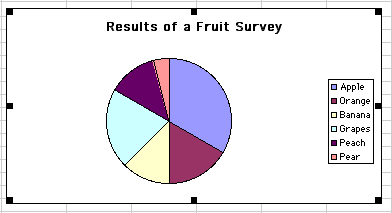
Ms. Mortimer's and Mr. Smalley's classes came into the lab after gathering data on various topics. After an introductory lesson on Excel, students entered and graphed their data, and then compared the graphs Excel produced to the graphs they drew the day before.
Ms. Richardson's Students Blog About the Declaration of Independence:
Ms. Richardson created a blog for her students that broke up the Declaration of Independence into five sections. Each day, they discussed each section, first online, then as a class, so that the students were all able to fully participate, and gained a deeper understanding of the document.
Grade 7 Boot Camp:
Both clusters in the 7th grade made it into the lab the day before the ELA long composition to do some last minute study island prep. Students chose the area in which they felt that they needed to work. Students left feeling more prepared for the big test!
8th Grade Socials Studies Uses Voicethread to Learn About Famous Inventors:
Ms. Summa's students used Voicethread, an interactive presentation tool, to share the information they research on different inventors. First they spent several days in the library, compiling their research, and then they created voicethreads for the class, in which they included images, text, drawings, and dialogue. When they finished, they shared their voicethreads with each other, and were able to give each other positive feedback. Here is an example:
7th Grade English Uses Glogster to Present About Non-Fiction:
Over the past month, students have been reading science-fiction books and recording their information in packets that Ms. Cortese created. When they entered the lab, they learned how to use Glogster, and then presented their information in a Glog, using text, images, audio, video, and more.
Wednesday, March 7, 2012
February 13th - March 9th
WEEKS 22, 23, 24:
Citywide Grade 6 Assessment to Help Guide the Curriculum:
During week 23, all 6th graders across the city took a technology assessment using a software on learning.com. Students were electronically grouped by feeder school, and spent a class period in the lab being tested on their word processing, research, and general internet skills. This data will be compiled and analyzed at the Ed. Center, and will help to shape both the elementary and middle school curriculums. I can't wait to discuss the results!
Title I Math Grant to Benefit All Students:
The math department pushed for a Title I grant, and received 3 new ELMO document cameras for the math department. Teachers can use the cameras to project their own notes, as well as let students project and alter their own work in real time. The cameras will live in Ms. Mercado, Ms. Lequire, and Ms. Mortimer's rooms, but they will be shared with all Bigelow math teachers.
8th Grade Italien Uses Blabberize to Present Biographies:
The 8th grade Italien class researched inspiring people in the library. Using Google docs, they wrote and edited scripts for their person's perspective, and used the website "Blabberize" to record and present their scripts. Her are some examples:
Jen G.: http://blabberize.com/view/id/713812
Liam C.: http://blabberize.com/view/id/715739
7C Use Google Docs to Present Biography Brochures:
Ms. Robles' students researched people who have made a difference in the world for their English class, and then created brochures using their Google docs accounts. Their brochures not only included facts and timelines, but they also included a poem, brainframe, and bibliography. Check out some examples:
Anna Z.:
https://docs.google.com/document/d/1mgmixBClhwhvcQuIghW1KKG5sJ4E3n7KaAhuVFN-Rxs/edit
Kayla H.:
https://docs.google.com/document/d/1Yj34e3_kWbsgfyKo6m1Fsaz04p5GH54O06TQvGCt15A/edit
Mr. Spiegel's Students Use Google Earth to Explore Latin America:
In Mr. Spiegel's class, students worked in groups of 3 to create tours of different Latin American countries, beginning and ending in Newton. They used the path and polygon features of Google Earth, as well as inserted videos and images. We should be seeing some final products in the weeks to come!
Mr. Hayes' Students Use Google Presentations to Collaborate on Volcano Research:
8th grade science students worked in groups of 3 to research various volcanoes in the library. Each group collaborated on a presentation in Google docs, focusing on one particular volcano, its location, and its characteristics. Students presented on their volcanoes in class, teaching the other students about their volcanoes. The presentations helped the students to work together to learn the material.
Citywide Grade 6 Assessment to Help Guide the Curriculum:
During week 23, all 6th graders across the city took a technology assessment using a software on learning.com. Students were electronically grouped by feeder school, and spent a class period in the lab being tested on their word processing, research, and general internet skills. This data will be compiled and analyzed at the Ed. Center, and will help to shape both the elementary and middle school curriculums. I can't wait to discuss the results!
Title I Math Grant to Benefit All Students:
The math department pushed for a Title I grant, and received 3 new ELMO document cameras for the math department. Teachers can use the cameras to project their own notes, as well as let students project and alter their own work in real time. The cameras will live in Ms. Mercado, Ms. Lequire, and Ms. Mortimer's rooms, but they will be shared with all Bigelow math teachers.
8th Grade Italien Uses Blabberize to Present Biographies:
The 8th grade Italien class researched inspiring people in the library. Using Google docs, they wrote and edited scripts for their person's perspective, and used the website "Blabberize" to record and present their scripts. Her are some examples:
Jen G.: http://blabberize.com/view/id/713812
Liam C.: http://blabberize.com/view/id/715739
7C Use Google Docs to Present Biography Brochures:
Ms. Robles' students researched people who have made a difference in the world for their English class, and then created brochures using their Google docs accounts. Their brochures not only included facts and timelines, but they also included a poem, brainframe, and bibliography. Check out some examples:
Anna Z.:
https://docs.google.com/document/d/1mgmixBClhwhvcQuIghW1KKG5sJ4E3n7KaAhuVFN-Rxs/edit
Kayla H.:
https://docs.google.com/document/d/1Yj34e3_kWbsgfyKo6m1Fsaz04p5GH54O06TQvGCt15A/edit
Mr. Spiegel's Students Use Google Earth to Explore Latin America:
In Mr. Spiegel's class, students worked in groups of 3 to create tours of different Latin American countries, beginning and ending in Newton. They used the path and polygon features of Google Earth, as well as inserted videos and images. We should be seeing some final products in the weeks to come!
Mr. Hayes' Students Use Google Presentations to Collaborate on Volcano Research:
8th grade science students worked in groups of 3 to research various volcanoes in the library. Each group collaborated on a presentation in Google docs, focusing on one particular volcano, its location, and its characteristics. Students presented on their volcanoes in class, teaching the other students about their volcanoes. The presentations helped the students to work together to learn the material.
Thursday, February 9, 2012
January 23th - February 10th
WEEKS 19, 20, 21:
These weeks seemed to be the weeks of powerpoints and oral presentations. I introduced the new features of Google presentation, and students collaborated to create interactive presentations, complete with buttons, animations and transitions. Here are some of their lessons:
8th Graders Learn About the Solar System:
Mr. Swift's students spent some time in both the library and the lab researching different parts of the solar system. Then in partners, they created elaborate Google presentations to teach the rest of the class about their parts of the solar system. Mr. Swift worked with the students using the writer's workshop method to edit and revise until they created incredibly polished finished products. Check out some of their presentations:
7th Grade French Study the Regions of the Nation:
Students in Ms. Hanley's French class studied the different regions of France with Ms. Montville in the library, and then came into the lab to use the new version of Google presentations. They created presentations to aid their oral presentations. Check out some of their finished products:
7th Grade Spanish Present on Food and Culture:
Students in Ms. Verdaguer's Spanish class are learning about the different foods and courses in a traditional Spanish meal. Students are researching and presenting their findings using a powerpoint, and will culminate the project with a meal! Muy bien!!
Click HERE to view a student example.
Ms. Richardson's Students Present Biographies:
Each student used the library to research a person who made an impact on society. They took their research, and created Google presentations that supported their oral presentations. The goal was to teach the class about their person and that person's impact on society. Check out some of their finished products!
Ms. Buttiglieri's Students Take a Tour of the Cell:
Students pretended that they were shrunken to microscopic proportions, and travelled through the cell, visiting each part. They needed to include visuals and descriptions, and the focus was creativity! Students created their brochures in their Google docs, and shared them with me to print. Check out some of the finished products!
7th Grade Math Learns About Graphing Using Green Globs and Geometer's Sketchpad:
Both Mr. Leone's and Ms. Hall's classes used a program called "Green Globs" to learn about the direction of positive and negative graphs. Then they applied their knowledge using a program called "Geometer's Sketchpad."
The accelerated classes also used Green Globs, but they used the program to graph linear equations. Both groups had a lot of fun, and felt that they learned a lot!
Friday, January 20, 2012
January 3, 2012 - January 20, 2012
WEEKS 16-18:
Ms. Krauss' Students Demonstrate Knowledge of the Periodic Table with Glogster:
Following several class periods in the library in which students researched their assigned elements, they came into the lab to demonstrate their information. Students used text, images, drawings, and videos to demonstrate their knowledge of the elements, creating a virtual periodic table for Ms. Krauss' class. Student presentations are on January 18th!
Mr. King's Students Express Themselves Through Choice:
After finishing Beowulf - A New Telling, students used Glogster, Garage Band, and Flip Video Cameras to create final projects that demonstrated their knowledge of character, plot, setting, mood, perspective, and more! Here is his website, as well as some examples!
Ms. Krauss' Students Demonstrate Knowledge of the Periodic Table with Glogster:
Following several class periods in the library in which students researched their assigned elements, they came into the lab to demonstrate their information. Students used text, images, drawings, and videos to demonstrate their knowledge of the elements, creating a virtual periodic table for Ms. Krauss' class. Student presentations are on January 18th!
Open the link below and click on the elements to see the student glogs:
Mr. King's Students Express Themselves Through Choice:
After finishing Beowulf - A New Telling, students used Glogster, Garage Band, and Flip Video Cameras to create final projects that demonstrated their knowledge of character, plot, setting, mood, perspective, and more! Here is his website, as well as some examples!
Avery's Glog - Character Log
Go to the link and click on each character to go to the character's page.
Max's Glog - Perspective Interview
Lillian's Glog - Hero's Journey
Go to the link and click each step of the hero's journey to go to the page.
Ms. Richardson's Students Encourage Tourism in the 13 Colonies:
After learning about the original 13 colonies in class, students broke up into three groups. Each group created a script to encourage people to visit / move to their cluster of colonies, and then filmed their scenes using flip video cameras. The students then uploaded all of their footage into iMovie, edited their movies, and added titles and transitions.
Wednesday, December 21, 2011
December 12-23, 2011
WEEKS 14 and 15:
Bigelow Ugly Holiday Sweater Contest:
Bigelow teachers showed their holiday spirit by participating in an ugly holiday sweater contest. It was $5 to enter, and all proceeds were donated directly to Dana Farber toward Megan Hall's Boston Marathon Run. Check out the teachers showing off their sweaters: http://animoto.com/play/LcnGcvPdsGmOJ0oTWYKEOw
Mr. Souza's Students Use Google Earth to Follow Darwin's Journey:
7th grade science learned all about Darwin, his voyage, and evolution. For this Google Earth Project, students created a folder that included at least 5 placemarks that marked different stops on Darwin's journey. The placemarks must include the location, the latitude and longitude, scientific observations, the biome, and a picture or video. Students then recorded the voyage as a narrated tour. We can't wait to see the finished products!
Mr. King Differentiates Instruction with Glogster:
Mr. King's class looked at the story "Beowulf - A New Telling" from a variety of angles, and used Glogster to demonstrate their understanding as well as their creativity. Each student could choose one of the 5 projects, and complete using webcameras, Garage Band and Glogster. Final products to come!
Beowulf Website
Ms. Martin's Students Use Glogster and Sketch-up to Design and Describe Their Dream Homes:
8th grade Spanish students designed their dream homes. They used Spanish terms to describe the location, and turned their lists of terms into paragraphs. They used Sketch-up and Google images to show the rooms in their homes, and recorded their paragraphs as audio files. Lastly, they responded to one another's glogs using the comment feature! This project allowed students to demonstrate their reading, writing, speaking, and creative skills!
Ms. Martin's Website
Examples:
6th Grade Students Practice Math with Khan Academy:
Many 6th grade students have set up Khan Academy accounts using their school Google docs accounts. These accounts allows students to practice math skills at their own levels, and earn points and move up levels when they have mastered concepts. Teachers can track their students through their own accounts. Students love the interactive scratch pad and the reward system. Check it out!
Khan Academy
Khan Academy Directions
Mr. Spiegel's Students Use Google Earth to Explore Culture:
Students in 6th grade geography are collaborating to create Google Earth tours that show culture throughout Europe. Each group has a driver, who navigates the computer, a leader, who guides the group and keeps the group on track, and a recorder, who takes notes and keeps track of the group's work. Check out Mr. Spiegel's website!
Mr. Spiegel's Website
Project Link
8th Grade Online Lab Reports:
Mr. Swift's students had the choice of hand writing their lab reports or completing them in Google docs. Their Google reports included Google drawings and a linked spread sheet with graphs of their data. Most students chose to experiment with the online version of the report. I can't wait to see the finished products!
Mr. Swift's Website with Lab Report Link
Bigelow Ugly Holiday Sweater Contest:
Bigelow teachers showed their holiday spirit by participating in an ugly holiday sweater contest. It was $5 to enter, and all proceeds were donated directly to Dana Farber toward Megan Hall's Boston Marathon Run. Check out the teachers showing off their sweaters: http://animoto.com/play/LcnGcvPdsGmOJ0oTWYKEOw
Mr. Souza's Students Use Google Earth to Follow Darwin's Journey:
7th grade science learned all about Darwin, his voyage, and evolution. For this Google Earth Project, students created a folder that included at least 5 placemarks that marked different stops on Darwin's journey. The placemarks must include the location, the latitude and longitude, scientific observations, the biome, and a picture or video. Students then recorded the voyage as a narrated tour. We can't wait to see the finished products!
Student Example:
Mr. King Differentiates Instruction with Glogster:
Mr. King's class looked at the story "Beowulf - A New Telling" from a variety of angles, and used Glogster to demonstrate their understanding as well as their creativity. Each student could choose one of the 5 projects, and complete using webcameras, Garage Band and Glogster. Final products to come!
Beowulf Website
Ms. Martin's Students Use Glogster and Sketch-up to Design and Describe Their Dream Homes:
8th grade Spanish students designed their dream homes. They used Spanish terms to describe the location, and turned their lists of terms into paragraphs. They used Sketch-up and Google images to show the rooms in their homes, and recorded their paragraphs as audio files. Lastly, they responded to one another's glogs using the comment feature! This project allowed students to demonstrate their reading, writing, speaking, and creative skills!
Ms. Martin's Website
Examples:
6th Grade Students Practice Math with Khan Academy:
Many 6th grade students have set up Khan Academy accounts using their school Google docs accounts. These accounts allows students to practice math skills at their own levels, and earn points and move up levels when they have mastered concepts. Teachers can track their students through their own accounts. Students love the interactive scratch pad and the reward system. Check it out!
Khan Academy
Khan Academy Directions
Mr. Spiegel's Students Use Google Earth to Explore Culture:
Students in 6th grade geography are collaborating to create Google Earth tours that show culture throughout Europe. Each group has a driver, who navigates the computer, a leader, who guides the group and keeps the group on track, and a recorder, who takes notes and keeps track of the group's work. Check out Mr. Spiegel's website!
Mr. Spiegel's Website
Project Link
8th Grade Online Lab Reports:
Mr. Swift's students had the choice of hand writing their lab reports or completing them in Google docs. Their Google reports included Google drawings and a linked spread sheet with graphs of their data. Most students chose to experiment with the online version of the report. I can't wait to see the finished products!
Mr. Swift's Website with Lab Report Link
Thursday, December 8, 2011
11/20/2011 - 12/9/2011
WEEKS 11-13:
Thanksgiving did not seem to slow things down at Bigelow, as the tech projects keep coming in full force. Here are some highlights from the past weeks:
Cluster 6A Explore European Culture:
Cluster 6A spent some time in the library using books and online resources to explore the 8 traits of culture in European countries. Students presented their information using Glogster - an interactive online poster making program. Students logged into their school accounts, created, and published some amazing work. Here are some examples:
http://200612724.edu.glogster.com/culture-project-/

Thanksgiving did not seem to slow things down at Bigelow, as the tech projects keep coming in full force. Here are some highlights from the past weeks:
Cluster 6A Explore European Culture:
Cluster 6A spent some time in the library using books and online resources to explore the 8 traits of culture in European countries. Students presented their information using Glogster - an interactive online poster making program. Students logged into their school accounts, created, and published some amazing work. Here are some examples:


Cluster 8F Compares Temperature and Precipitation Around the World:
Cluster 8F worked in pairs to make predictions about and analyze actual precipitation and temperature data of cities from around the world. They made predictions based on latitude, graphed actual data, and recorded their findings, explaining them in a Google Spreadsheet. Here is an example:
Cluster 8E Differentiates Instruction, Using Websites and YouTube:
Mr. Swan's students needed to write an essay comparing and contrasting a scene from the play Inherit the Wind and the movie. Check out his project website to see how he used Google Sites, Spreadsheets, and YouTube to differentiate and clarify the lesson for all students.
Subscribe to:
Posts (Atom)